
WordPress Development Hong Kong

A WordPress site for Hong Kong businesses: your team can update it, Google can understand it, and you can extend it without starting over.

WordPress onlyTheme, plugin and admin work
You stay in controlHandover docs and training
Trilingual buildTraditional / Simplified / English

What is WordPress development?

WordPress development in Hong Kong covers the theme and templates, plugin selection, custom content structures, admin editing experience, performance tuning and security setup behind a WordPress site. Working with a WordPress agency locally matters for three practical reasons: someone can sit with your team on the admin, multilingual content (Traditional, Simplified, English) is handled from the start, and handover support happens in your timezone.

Last updated: October 2026 · Maintained by the Jionghui editorial team

WordPress Development Hong Kong — service diagram

Custom implementation without a generic theme look

We turn the approved UI into a dedicated WordPress theme, preserving the brand while organising pages, services, news and enquiries into practical editorial areas.

Maintainable, secure and extensible

The site follows standard update practices without modifying WordPress core. Handover covers backups, security, roles and content updates so the platform can grow with the business.

01 / Scope

What does WordPress development cover?

Six workstreams covering the full path from templates to security for Hong Kong sites. Take the whole build, or just the missing piece.

01

Theme and template build

We build or customise the theme around your brand, and the same team handles the front-end build, so the live site matches the signed-off design.

02

Plugin selection and pruning

Only plugins with a clear purpose stay, each checked for conflicts and load cost, so one small feature does not slow the whole site down.

03

Custom post types and fields

Services, cases and articles become structured fields, so admin input is orderly and front-end output is predictable.

04

Admin usability

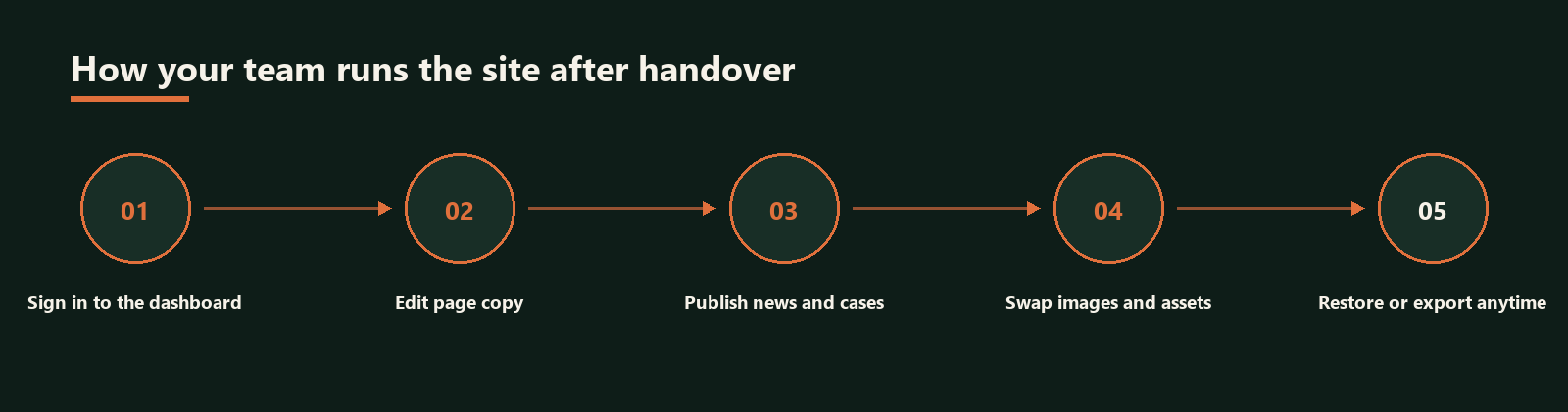
Menus and edit screens are organised around how you actually work, so non-technical colleagues can swap images, edit copy and add pages.

05

Performance and caching

Image sizing, caching, database cleanup and asset loading are handled to keep LCP and response times under control.

06

Security, backups and launch

Backup schedules with a tested restore path, user roles, baseline hardening, then deployment and search indexing.

02 / What is included

Every WordPress build includes

The following are part of the delivery standard, not paid add-ons.

  • Theme build and front-end coding
  • Responsive treatment for tablet and mobile
  • Custom post types and fields
  • Admin menu and edit screen tidy-up
  • Written handover documentation
  • Essential plugin setup
  • Backup schedule and restore test
  • Baseline security and role setup
  • Image compression and caching
  • 30 days of post-launch support

03 / Delivery process

WordPress development process

Six stages, each with a defined deliverable, so you do not discover after launch that the admin is unworkable.

Discovery

Business goals, current site condition, required features and languages.

Structure planning

Page list, content types and fields agreed before any layout work starts.

Theme and build

Theme and templates implemented, including responsive rules and image ratios.

Plugins and features

Required plugins installed and configured, each checked for conflicts and load impact.

Testing and launch

Cross-device and cross-browser testing, form and enquiry flow checks, then deployment and indexing.

Handover and support

Admin documentation plus short-term technical support for immediate post-launch issues.

04 / Ways to work together

How can we work together?

New WordPress build

Theme, structure and launch handled end to end. Suits new companies or sites that can no longer be maintained.

Migrate to WordPress

Move a static or legacy site onto WordPress while keeping existing content and URL structure.

WordPress health check

No rebuild. We fix performance, security, backups and admin maintainability only.

05 / Why Jionghui

Four things to check in a service provider

01

No plugin hoarding

Every plugin maps to a stated need and is assessed for load cost and maintenance risk.

02

An admin you can actually use

The admin is designed around your editing habits, so you do not need us to change a photo or a sentence.

03

Performance and security together

Backups, roles, caching and image sizing are set before launch, not after something breaks.

04

Take only one piece

Existing sites can commission just a theme refresh, a speed project or hardening, without a rebuild.

06 / Service comparison

Jionghui WordPress build vs installing a theme yourself

Jionghui buildDIY theme install
Template sourceBuilt around your brand and service structurePicked from a marketplace then tweaked
Content structureCustom post types and fields, orderly inputEverything dumped into posts or pages
Plugin managementEach one assessed for need and load costWhatever the demo site shipped with
Admin experienceMenus and fields arranged around your workflowTheme default edit screens
Performance and securityCaching, backups and roles done before launchUsually deferred until something breaks
Future extensionNew features reuse the existing structureOften needs a rebuild or theme swap

07 / FAQ

Frequently asked questions

Why work with a WordPress agency in Hong Kong rather than a freelancer?
The difference shows up after launch. A local agency documents the admin and trains your team, keeps core and plugin updates on a schedule, and is reachable when something breaks. With a freelancer the build itself may be fine, but maintenance, backups and multilingual content usually fall back on you — and those are exactly where WordPress sites tend to fail.
Why WordPress rather than another platform?
WordPress gives you custom content structures, an admin your team can operate, and a mature plugin ecosystem for memberships, e-commerce and multilingual setups later. For a company that updates its own content without an in-house technical team, the ongoing cost is comparatively controllable.
How is the cost of a WordPress build calculated?
Mainly page count, whether custom post types are needed, feature complexity such as forms, memberships or e-commerce, the number of languages, and whether existing content is reused. We quote item by item rather than bundling theme, plugins and custom work into one vague figure.
Can I update content myself after handover?
Yes. The admin fields and menus are designed around how you edit, and handover includes documentation. Swapping images, editing copy, adding service pages and publishing articles are all self-service.
Will a WordPress site be slow?
Speed comes down to theme and plugin choices, image handling and caching, not WordPress itself. During the build we control plugin count, image sizes and asset loading, and measure LCP and response times before launch.
How is security handled?
Backup schedules with an actual restore test, separated user roles, unnecessary features disabled, and update channels left open for core and plugins. An ongoing maintenance plan is available after launch.
Can existing content and URLs be kept?
Yes. Migration keeps your existing posts and pages, and preserves the URL structure where possible or sets up 301 redirects, so accumulated search rankings are not lost.

Not sure whether your site should be rebuilt on WordPress?

Send us the current URL and what you need. We will tell you what can be kept, what has to be rebuilt, and which performance and security items to fix first.

Free build assessment